We Use CookiesWe use cookies to enhance the security, performance, functionality and for analytical and promotional activities. By continuing to browse this site you are agreeing to our privacy policy

9 Best Professional 11 X 17 Printers 2026 in the United States
How do we rank products for you?

Our technology thoroughly searches through the online shopping world, reviewing hundreds of sites. We then process and analyze this information, updating in real-time to bring you the latest top-rated products. This way, you always get the best and most current options available.

headphones-stars

Our Top Picks

#1

Winner

Epson EcoTank ET-15000 Wireless Color All-in-One Supertank Printer with Scanner, Copier, Fax, Ethernet and Printing up to 13 x 19 Inches, White

Rating
10.0
Chosen by1,137
Print Speed
Paper Handling
Ink or Toner Type

Most important from
2422 reviews

Print Speed
Despite not being as fast as laser printers, the print quality and low price make it an excellent addition.
Paper Handling
The ability to print on paper up to 13 x 19 inches without issues is a significant advantage.
Ink or Toner Type
Switching from HP to Epson EcoTank has been a cost-effective choice, with easy setup and immediate savings.
Print Quality
The vibrant color prints make it a favorite for small businesses, especially in sublimation.
Size and Build
The large print size area and easy ink loading make it great value for money.

The Epson EcoTank ET-15000 is an all-in-one printer designed to meet the needs of professionals, especially those requiring large-format printing up to 13 x 19 inches. A standout feature is its innovative cartridge-free printing system, which uses high-capacity ink tanks instead of traditional cartridges, significantly reducing the cost of consumables. This could lead to substantial savings and less frequent ink replacements, enough to print up to 7,500 pages in black and 6,000 in color. Additionally, the EcoTank system helps reduce cartridge waste, making it an environmentally friendly option.

The printer supports versatile paper handling, including specialty media through its rear feed, and can copy and scan documents up to 8.5 x 14 inches via the automatic document feeder (ADF). It also offers auto-duplex (double-sided) printing and borderless printing up to 11 x 17 inches. Connectivity options are robust, with Wi-Fi, Ethernet, and Wi-Fi Direct, making it easy to print from various devices. The included Epson Smart Panel app enhances usability by allowing mobile control.

Print quality is high, suitable for professional use, though the maximum print speed is moderate at 17 ppm for monochrome and 9 ppm for color. Users may find these speeds sufficient for regular office tasks but potentially slow for high-volume printing. The build quality is solid but does result in a relatively bulky and heavy unit, weighing 26.5 pounds.

Rating
10.0
Chosen by1,137
Print Speed
Paper Handling
Ink or Toner Type

Most important from
2422 reviews

Print Speed
Despite not being as fast as laser printers, the print quality and low price make it an excellent addition.
Paper Handling
The ability to print on paper up to 13 x 19 inches without issues is a significant advantage.
Ink or Toner Type
Switching from HP to Epson EcoTank has been a cost-effective choice, with easy setup and immediate savings.
Print Quality
The vibrant color prints make it a favorite for small businesses, especially in sublimation.
Size and Build
The large print size area and easy ink loading make it great value for money.
#2

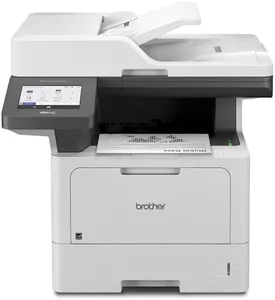
Brother Professional Laser Printer All-in-One with Scanner and Copier, High-Speed 50 ppm Monochrome Printing, Wireless Network Ready, Dual-Band WiFi, Auto 2-Sided Print (MFC-L5915DW)

Rating
9.7
Print Speed
Paper Handling
Connectivity

Most important from
152 reviews

Print Speed
Excellent for busy offices with its fast 50 pages per minute print speed and efficient document handling.
Paper Handling
Handles envelopes without creases, a significant benefit for professional presentations.
Connectivity
Easy setup on both wired and wireless networks, making it convenient for various office setups.
Cost of Consumables
Toner can be pricey, but it lasts a long time, balancing cost with longevity.
Print Quality
After several years, print quality may degrade, leading to the need for replacement.

The Brother MFC-L5915DW is a robust monochrome laser printer designed for busy offices and small businesses. One of its main strengths is its impressive print speed of up to 50 pages per minute (ppm), which ensures fast and efficient document handling. The printer also offers high-quality output with a resolution of 1200 x 1200 dpi, making it suitable for professional documents. Its multifunctional capabilities allow for printing, copying, scanning, and duplex (double-sided) operations, adding to its versatility.

Another notable feature is the 70-page capacity auto document feeder that supports high-volume, two-sided scanning at speeds up to 56 images per minute (ipm), which is ideal for offices that require extensive document handling. Connectivity options are flexible, with built-in Gigabit Ethernet, dual-band wireless networking, and USB support, accommodating various office setups and mobile printing needs. This printer also supports voice control with Amazon Alexa, enhancing user convenience.

However, there are some drawbacks. The printer's maximum media size is limited to 8.5 x 14 inches, which does not fulfill the 11x17 criteria for some professional users. Additionally, the initial cost of the printer and the cost of consumables like the high-yield toner cartridges could be a consideration for budget-conscious buyers. Weighing 38.3 pounds and having a fairly large footprint, the printer may also require significant space in the office. While the printer is packed with features and offers high efficiency, it may not be the best fit for those specifically needing 11x17 printing capabilities.

Rating
9.7
Print Speed
Paper Handling
Connectivity

Most important from
152 reviews

Print Speed
Excellent for busy offices with its fast 50 pages per minute print speed and efficient document handling.
Paper Handling
Handles envelopes without creases, a significant benefit for professional presentations.
Connectivity
Easy setup on both wired and wireless networks, making it convenient for various office setups.
Cost of Consumables
Toner can be pricey, but it lasts a long time, balancing cost with longevity.
Print Quality
After several years, print quality may degrade, leading to the need for replacement.
#3

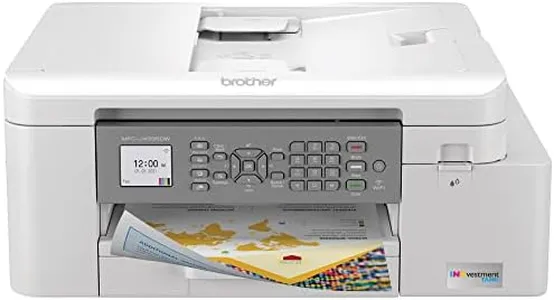
Brother MFC-J4335DW INKvestment Tank Wireless All-in-One Color Inkjet Printer, Up to 1-Year of Ink in-Box, Duplex Printing, Mobile and Cloud Print, Works with Alexa

Rating
9.7
Print Speed
Paper Handling
Connectivity

Most important from
4234 reviews

Print Speed
The speed of this printer is unreal, printing on both sides of a page faster than most printers do on one side.
Paper Handling
The automatic duplex printing feature feels miraculous, handling double-sided printing without needing to reinsert the paper.
Connectivity
Setup and connectivity are smooth, with the printer working flawlessly once configured, even on Wi-Fi.
Ink or Toner Type
The ink economy is impressive, with tanks not draining every time the printer is turned on, unlike other brands.
Print Quality
Prints nicely and quickly, with both pictures and text coming out sharp and clear.

The Brother MFC-J4335DW INKvestment Tank All-in-One Printer offers several notable strengths that make it a solid choice for professional use. One of its major advantages is the inclusion of up to one year of ink in the box, reducing the hassle of frequent cartridge changes and potentially saving money on ink costs. The INKvestment Tank technology ensures more pages per cartridge and eliminates manual refilling, making it very convenient to use.

The printer also supports automatic duplex printing, which saves time and paper. Connectivity options include both USB and wireless, and it is compatible with various devices like smartphones, tablets, and laptops. The use of the Brother Mobile Connect App further enhances usability by providing easy navigation for printing tasks directly from your mobile devices. Print speeds are decent with 20 ppm for monochrome and 16 ppm for color, which should suffice for most professional needs.

However, there are a few limitations to consider. The maximum print size supported is 8.5 x 11 inches. The input sheet capacity is also somewhat limited at 150 sheets, which could be a drawback for high-volume printing environments. The printer has a relatively compact size and build, weighing 17.6 pounds. The ongoing cost of consumables should be considered, particularly if high-yield cartridges are used frequently. In summary, the Brother MFC-J4335DW is a versatile and user-friendly printer suitable for small to medium-sized businesses, offering convenience and cost savings in ink.

Rating
9.7
Print Speed
Paper Handling
Connectivity

Most important from
4234 reviews

Print Speed
The speed of this printer is unreal, printing on both sides of a page faster than most printers do on one side.
Paper Handling
The automatic duplex printing feature feels miraculous, handling double-sided printing without needing to reinsert the paper.
Connectivity
Setup and connectivity are smooth, with the printer working flawlessly once configured, even on Wi-Fi.
Ink or Toner Type
The ink economy is impressive, with tanks not draining every time the printer is turned on, unlike other brands.
Print Quality
Prints nicely and quickly, with both pictures and text coming out sharp and clear.

Buying Guide for the Best Professional 11 X 17 Printers

Choosing the right professional 11 x 17 printer can be a daunting task, but with the right approach, you can find a model that perfectly suits your needs. The key is to understand the specifications that matter most for your specific use case. Whether you need a printer for high-quality graphics, large-scale documents, or frequent use, knowing what to look for will help you make an informed decision.
Print ResolutionPrint resolution refers to the number of dots per inch (DPI) that a printer can produce. Higher DPI means more detailed and sharper images. For professional use, especially if you're printing graphics or detailed documents, a higher resolution (typically 1200 DPI or more) is preferable. If your primary need is text documents, a lower resolution (600 DPI) might suffice.
Print SpeedPrint speed is measured in pages per minute (PPM). This spec is crucial if you need to print large volumes quickly. For professional settings, a higher PPM (20-30 PPM or more) is ideal to ensure efficiency. If your printing needs are less frequent, a lower PPM might be acceptable.
Paper HandlingPaper handling refers to the printer's ability to manage different paper sizes and types. For 11 x 17 printing, ensure the printer can handle this size without issues. Additionally, consider the paper tray capacity; larger trays mean less frequent refilling, which is beneficial in a busy office environment.
ConnectivityConnectivity options include USB, Ethernet, Wi-Fi, and sometimes Bluetooth. For professional use, having multiple connectivity options is beneficial for flexibility and ease of use. If you need to print from various devices or locations, ensure the printer supports wireless connections.
Ink or Toner TypePrinters use either inkjet or laser technology. Inkjet printers are generally better for high-quality color prints and photos, while laser printers are more efficient for high-volume text documents. Choose based on your primary printing needs: color and quality for inkjet, speed and volume for laser.
Duty CycleDuty cycle refers to the maximum number of pages a printer can handle per month without issues. For professional use, a higher duty cycle is preferable to ensure the printer can handle your workload. Assess your monthly printing volume and choose a printer with a duty cycle that exceeds this number to ensure reliability.
Cost of ConsumablesConsumables include ink or toner cartridges and paper. Consider the cost and availability of these items, as they can significantly impact the long-term cost of the printer. Look for printers with affordable and readily available consumables to keep your operating costs manageable.
Print QualityPrint quality encompasses the overall output of the printer, including color accuracy and sharpness. For professional use, especially in graphic design or photography, high print quality is essential. Look for reviews and sample prints to gauge the print quality before making a decision.
Size and BuildThe physical size and build of the printer are important for fitting into your workspace. Ensure the printer's dimensions are suitable for your office and that it is built robustly to withstand frequent use. Compact models are ideal for smaller spaces, while larger models may offer more features.

FAQ