We Use CookiesWe use cookies to enhance the security, performance, functionality and for analytical and promotional activities. By continuing to browse this site you are agreeing to our privacy policy

10 Best Embroidery Machine 2026 in the United States
How do we rank products for you?

Our technology thoroughly searches through the online shopping world, reviewing hundreds of sites. We then process and analyze this information, updating in real-time to bring you the latest top-rated products. This way, you always get the best and most current options available.

headphones-stars

Our Top Picks

#1

Winner

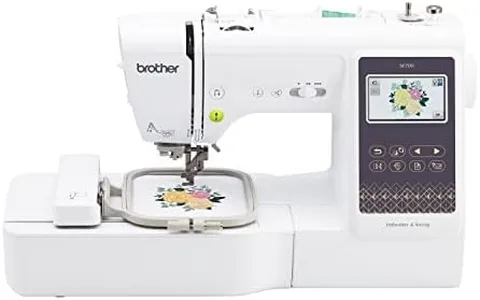
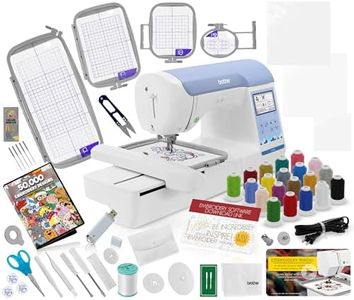
Brother SE700 Sewing and Embroidery Machine, Wireless LAN Connected, 135 Built-in Designs, 103 Built-in Stitches, Computerized, 4" x 4" Hoop Area, 3.7" Touchscreen Display, 8 Included Feet, White

Rating
10.0
Chosen by1,195
Embroidery Area
Built-in Designs and Fonts
Connectivity Options

Most important from
905 reviews

Embroidery Area
The 4" x 4" hoop area provides just enough space for your creative genius to flourish.
Built-in Designs and Fonts
With 135 built-in designs, it feels like having an artist in a tiny, touchscreen box, offering endless creative possibilities.
Connectivity Options
The Brother SE700 is more connected than ever with its seamless WiFi capability, making design uploads incredibly fast and simple.
Ease of Use
Its 3.7" touchscreen display is smooth and user-friendly, making navigation and creation a breeze.

The Brother SE700 is a versatile sewing and embroidery machine that combines both functions seamlessly, making it a great option for beginners and intermediate users. One of its standout features is the 4" x 4" embroidery area, which is suitable for most standard projects, though it might be limiting for larger designs. With 135 built-in designs, 10 embroidery lettering fonts, and 103 sewing stitches, it offers a wide array of options for creativity and personalization.

The 3.7-inch LCD touchscreen is user-friendly, allowing for easy navigation and editing of designs directly on the machine. Additionally, the machine is equipped with eight different sewing feet and an automatic needle threader, adding to its convenience and ease of use. A significant advantage is its wireless LAN connectivity and the Artspira mobile app, which facilitates design transfers and custom pattern creation, enhancing the user experience.

At 15.6 pounds, it's relatively portable but still requires a dedicated space. The comprehensive warranty coverage is reassuring, though the specific voltage requirement confines its use to the US. The Brother SE700 is well-suited for those who want a reliable and feature-rich machine for both sewing and embroidery projects, with advanced connectivity options and a variety of built-in designs to kickstart their creative journey.

Rating
10.0
Chosen by1,195
Embroidery Area
Built-in Designs and Fonts
Connectivity Options

Most important from
905 reviews

Embroidery Area
The 4" x 4" hoop area provides just enough space for your creative genius to flourish.
Built-in Designs and Fonts
With 135 built-in designs, it feels like having an artist in a tiny, touchscreen box, offering endless creative possibilities.
Connectivity Options
The Brother SE700 is more connected than ever with its seamless WiFi capability, making design uploads incredibly fast and simple.
Ease of Use
Its 3.7" touchscreen display is smooth and user-friendly, making navigation and creation a breeze.
#2

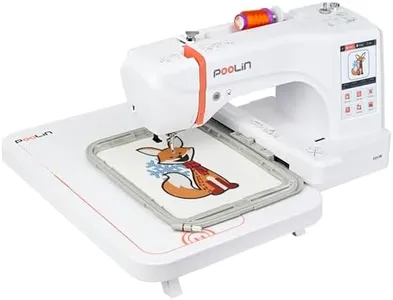
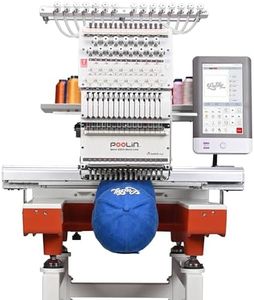
PooLin EOC06 Embroidery Machine,7" Touchscreen,7.9"x11" Hoop Area,Computerized Home Embroidery Machine for Beginners Gifts,200 Built-in Designs,USB & Wireless,Software,4 Hoops,Thread,Bobbin,Stabilizer

Rating
10.0
Hoop Sizes
Ease of Use

Most important from
521 reviews

Hoop Sizes
The large hoop size and competitive price point make this machine a standout choice, offering features comparable to higher-priced brands.
Ease of Use
From unboxing to embroidering in just 10 minutes, setup is incredibly user-friendly and quick.

The POOLIN EOC06 Embroidery Machine is designed for both hobbyists and small business owners looking to create custom embroidery on clothing and other materials. One of its standout features is the large embroidery area of 7.9x11 inches, which allows for substantial designs without needing constant hoop adjustments. The machine comes with multiple hoop sizes to accommodate various projects, making it versatile for different fabric types and designs.

The built-in library includes 156 designs and 8 fonts, along with support for 10 languages, which helps beginners get started quickly. The 7-inch color touchscreen is user-friendly, resembling mobile phone functionality, making it easier to select and edit patterns. Additionally, its computerized features, like automatic needle threading and thread trimming, enhance the user experience and efficiency.

A significant advantage is the machine’s included accessories, such as threads, stabilizers, and pre-wound bobbins, which ensure that users can start their projects right away. Plus, the support available through social media and the official YouTube channel is an excellent resource for users seeking guidance. There are a few drawbacks to consider. While the machine handles a variety of fabrics, it may require different needles for thicker materials, which could pose a learning curve for new users. Additionally, while many users appreciate the built-in designs, those wanting highly personalized patterns will need to invest in additional embroidery design software, which may require further technical knowledge. The weight of 35 pounds might also make it less portable for those needing to move their machine frequently.

Rating
10.0
Hoop Sizes
Ease of Use

Most important from
521 reviews

Hoop Sizes
The large hoop size and competitive price point make this machine a standout choice, offering features comparable to higher-priced brands.
Ease of Use
From unboxing to embroidering in just 10 minutes, setup is incredibly user-friendly and quick.
#3

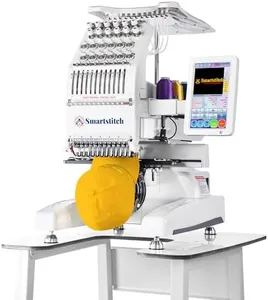
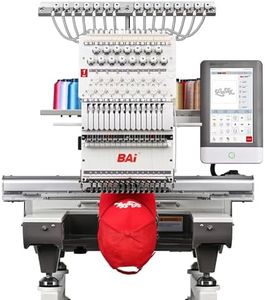
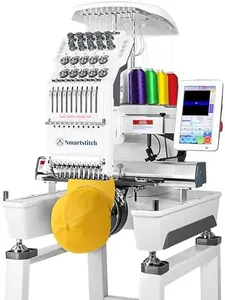
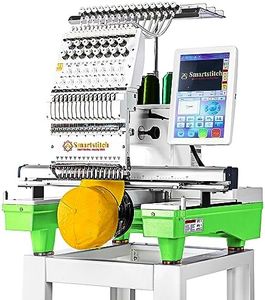
Smartstitch S-1201 Compact Embroidery Machine with 12 Needles, 1200SPM Max Speed, 10“ Screen, Wifi, 9.5"x12.6" Embroidery Area, Your First Commercial Embroidery Machine for Flat, Hat, T-shirt and more

Rating
9.1
Built-in Designs and Fonts
Stitching Speed
Hoop Sizes

Most important from
208 reviews

Built-in Designs and Fonts
The Smartstitch S-1201's built-in fonts and lettering functions, combined with quality embroidery files, deliver excellent results.
Stitching Speed
This machine is not only fast and efficient but also compact, making it a great space-saving option for home-based businesses.
Hoop Sizes
Mighty hoops make the hooping process easier and more secure, significantly reducing setup time and enhancing efficiency.
Ease of Use
The comprehensive training and numerous YouTube videos make setting up and getting started with the Smartstitch S-1201 a breeze.

The Smartstitch S-1201 Compact Embroidery Machine is designed for those looking to kickstart a commercial embroidery venture from home. Its standout feature is the ample embroidery area of 9.5" x 12.6", allowing for larger projects, while the 1200 stitches per minute (SPM) speed promises efficient work. The machine is equipped with a sizable 7-inch touchscreen, making navigation and selection of built-in designs and fonts straightforward, which can appeal to beginners and professionals alike.

One of the notable strengths is its versatility; it can handle a wide range of materials, including denim, leather, and canvas, making it suitable for different embroidery applications. Plus, it comes with a starter pack of essential supplies, which is great for those just starting out. The provided training and technical support are also significant advantages, as they help users get set up and troubleshoot any issues, ensuring a smoother experience.

However, there are some considerations. The machine's weight at 39kg might make it less portable for some users, even though it is described as compact. Additionally, while it supports a vast number of memory stitches, the reliance on USB for file transfers may not appeal to users seeking wireless connectivity options. Given its commercial-grade features, it may also come with a steeper learning curve for absolute beginners compared to simpler home embroidery machines.

Rating
9.1
Built-in Designs and Fonts
Stitching Speed
Hoop Sizes

Most important from
208 reviews

Built-in Designs and Fonts
The Smartstitch S-1201's built-in fonts and lettering functions, combined with quality embroidery files, deliver excellent results.
Stitching Speed
This machine is not only fast and efficient but also compact, making it a great space-saving option for home-based businesses.
Hoop Sizes
Mighty hoops make the hooping process easier and more secure, significantly reducing setup time and enhancing efficiency.
Ease of Use
The comprehensive training and numerous YouTube videos make setting up and getting started with the Smartstitch S-1201 a breeze.

Buying Guide for the Best Embroidery Machine

Choosing the right embroidery machine can be a rewarding experience, especially if you enjoy creating personalized designs on fabric. The key to finding the best fit for you is to understand the various features and specifications that different models offer. By knowing what to look for, you can make an informed decision that matches your needs and skill level. Here are some important specifications to consider when selecting an embroidery machine.
Embroidery AreaThe embroidery area refers to the maximum size of the design that the machine can stitch in one go. This is important because it determines the scale of projects you can undertake. Smaller embroidery areas (4x4 inches) are suitable for beginners and small projects like monograms and patches. Medium areas (5x7 inches) offer more flexibility for larger designs and are great for intermediate users. Larger areas (8x12 inches or more) are ideal for advanced users who want to create large, intricate designs. Choose an embroidery area based on the types of projects you plan to work on.
Built-in Designs and FontsBuilt-in designs and fonts are pre-loaded patterns and text styles that come with the machine. These are important because they provide a starting point for your projects and can save you time. Machines with a larger number of built-in designs and fonts offer more variety and creativity. Beginners might prefer a machine with a good selection of built-in options to get started easily, while more advanced users might look for machines that allow for importing custom designs via USB or software.
Stitching SpeedStitching speed is measured in stitches per minute (SPM) and indicates how fast the machine can complete a design. This is important for efficiency, especially if you plan to do a lot of embroidery. Lower speeds (up to 400 SPM) are suitable for beginners who need more control and precision. Medium speeds (400-800 SPM) are good for intermediate users who want a balance between speed and control. Higher speeds (800+ SPM) are ideal for advanced users who need to complete large projects quickly. Consider your comfort level and the volume of work you plan to do when choosing the stitching speed.
Hoop SizesHoop sizes refer to the frames that hold the fabric in place while the machine stitches the design. This is important because different projects require different hoop sizes. Smaller hoops are great for small designs and detailed work, while larger hoops are necessary for bigger projects. Some machines come with multiple hoop sizes, offering more versatility. Beginners might start with a machine that includes a few basic hoop sizes, while advanced users might look for machines that offer a wide range of hoop sizes to accommodate various project needs.
Connectivity OptionsConnectivity options refer to how the machine can connect to other devices or software. This is important for importing custom designs and updating the machine's software. Basic machines might only have built-in designs, while more advanced models offer USB ports, Wi-Fi, or Bluetooth connectivity. Beginners might be satisfied with a machine that has a good selection of built-in designs, while more advanced users will benefit from the ability to import and edit custom designs. Consider how tech-savvy you are and whether you plan to use custom designs when evaluating connectivity options.
Ease of UseEase of use encompasses features like an intuitive interface, automatic threading, and user-friendly controls. This is important because it affects how quickly you can learn to use the machine and how enjoyable the experience is. Beginners should look for machines with clear instructions, easy-to-navigate menus, and helpful features like automatic needle threading and thread cutting. Intermediate and advanced users might prioritize machines with more advanced features but still appreciate a user-friendly interface. Think about your comfort level with technology and how much time you want to spend learning to use the machine.

FAQ