We Use CookiesWe use cookies to enhance the security, performance, functionality and for analytical and promotional activities. By continuing to browse this site you are agreeing to our privacy policy

10 Best Gaming Motherboards 2026 in the United States

How do we rank products for you?

Our technology thoroughly searches through the online shopping world, reviewing hundreds of sites. We then process and analyze this information, updating in real-time to bring you the latest top-rated products. This way, you always get the best and most current options available.

headphones-stars

Our Top Picks

#1

Winner

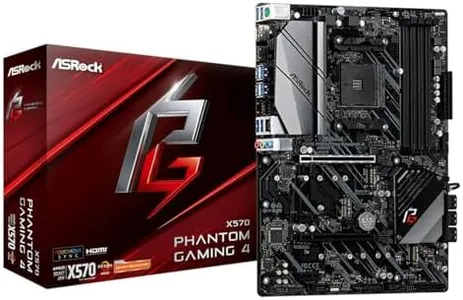
ASRock X570 Phantom Gaming 4AM4/USB3.2/HDMI/RJ45 Motherboard

Rating
10.0
Chosen by1,417
Form Factor
Connectivity

Most important from
789 reviews

Form Factor
Delivers a solid, reliable performance with a well-thought-out layout that makes installation straightforward.
Connectivity
Network stability is excellent when using a clean Windows setup with manufacturer drivers, eliminating common issues like network drops and system hangs.

The ASRock X570 Phantom Gaming 4 is a solid choice for gamers using AMD Ryzen 2000 and 3000 series processors thanks to its AM4 socket and X570 chipset, which supports the latest AMD CPU features. It has a sturdy 10-phase power design that helps with stable performance, especially if you plan to overclock your RAM to speeds above 4000 MHz. With four DDR4 RAM slots, it supports up to 128 GB of memory, which is plenty for gaming and multitasking.

For expansion, it offers two PCIe 4.0 x16 slots suitable for multiple graphics cards (AMD Quad Crossfire support), plus additional PCIe 4.0 x1 slots for other components. Storage options are strong, featuring eight SATA3 ports and two M.2 slots, including one that supports PCIe Gen4 x4 for ultra-fast NVMe SSDs. This makes it easy to set up a fast and spacious storage system. Connectivity is comprehensive with USB 3.2 Gen2 ports on the rear and plenty of Gen1 USB ports for peripherals. It includes a reliable Intel Gigabit LAN port for wired internet, which is preferred for low-latency online gaming. On the audio side, it delivers 7.1 channel HD sound powered by a Realtek ALC1200 codec and quality audio capacitors, providing clear and immersive sound.

The motherboard supports HDMI and DisplayPort outputs for integrated graphics if needed, and the BIOS/UEFI interface from ASRock is user-friendly for beginners while still offering advanced features for tuning. One downside is that it does not include built-in Wi-Fi, requiring a separate card or adapter if wireless is needed. Also, while the power design and features are good, this board is more of a mid-range option compared to higher-end X570 models offering additional premium features. This makes the ASRock X570 Phantom Gaming 4 a dependable, well-rounded motherboard that fits gamers looking for strong performance, solid connectivity, and upgrade options without extra frills or a high price.

Rating
10.0
Chosen by1,417
Form Factor
Connectivity

Most important from
789 reviews

Form Factor
Delivers a solid, reliable performance with a well-thought-out layout that makes installation straightforward.
Connectivity
Network stability is excellent when using a clean Windows setup with manufacturer drivers, eliminating common issues like network drops and system hangs.
#2

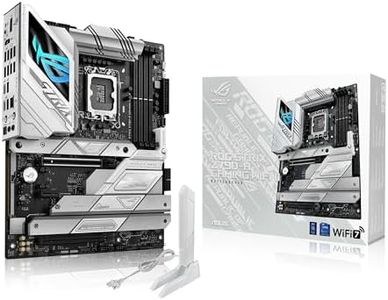
ASUS ROG Strix Z790-A Gaming WiFi II (WiFI 7) LGA 1700(Intel 14th & 13th & 12th Gen) ATX gaming motherboard(DDR5,5X M.2 slots,PCIe 5.0 x16,front-panel USB connector with PD 3.0 up to 30W)

Rating
9.7
Chipset
PCIe Slots
Connectivity

Most important from
448 reviews

Chipset
Supports 14th Gen processors out of the box with no need for a BIOS update.
PCIe Slots
PCIe lanes do not get bottlenecked by connecting extra M.2 drives or expansion cards.
Connectivity
Fast internet connectivity ensures smooth online gaming and multitasking.
BIOS/UEFI
The BIOS is easy to navigate and makes overclocking relatively simple.

The ASUS ROG Strix Z790-A Gaming WiFi II is an ATX motherboard designed for gamers, offering compatibility with Intel's 14th, 13th, and 12th Gen processors via its LGA 1700 socket. Its robust power solution with a 16+1+2 configuration ensures stable performance even for high-demand gaming setups, backed by quality alloy chokes and capacitors and efficient thermal management with comprehensive heatsinks and thermal pads. The ability to use DDR5 RAM with a total capacity of up to 192 GB makes it suitable for intense gaming and multitasking scenarios.

The motherboard features ample PCIe slots, including one PCIe 5.0 x16 SafeSlot, providing future-proofing for upcoming hardware upgrades and high-end GPUs. Storage is well-supported with five PCIe 4.0 M.2 slots, ensuring fast read and write speeds for game loading times and other applications. Connectivity options are plentiful, including USB ports of varying speeds (20Gbps, 10Gbps, and 5Gbps), HDMI 2.1, DisplayPort 1.4, and a front-panel USB connector with PD 3.0 up to 30W, which is convenient for fast charging devices.

The BIOS/UEFI interface is likely to be user-friendly based on ASUS's reputation, offering customization and optimization options for gaming performance. This motherboard is well-suited for gamers looking for durability, high performance, and future-proof features.

Rating
9.7
Chipset
PCIe Slots
Connectivity

Most important from
448 reviews

Chipset
Supports 14th Gen processors out of the box with no need for a BIOS update.
PCIe Slots
PCIe lanes do not get bottlenecked by connecting extra M.2 drives or expansion cards.
Connectivity
Fast internet connectivity ensures smooth online gaming and multitasking.
BIOS/UEFI
The BIOS is easy to navigate and makes overclocking relatively simple.
#3

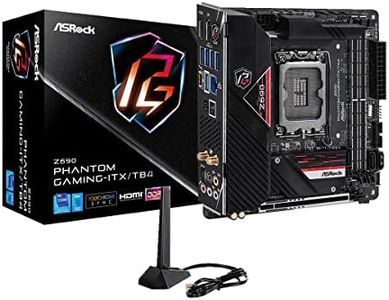
ASRock Z690 Phantom Gaming-ITX/TB4 LGA 1700 Intel Z690 SATA 6Gb/s DDR5 Mini ITX Intel Motherboard

Rating
8.8
Form Factor
Storage Options
Connectivity

Most important from
46 reviews

Form Factor
Easy to install and fits nicely in the case, making setup hassle-free.
Storage Options
Offers lots of SATA connections, perfect for those with a compulsive collection of drives.
Connectivity
The preinstalled Wi-Fi chip delivers ethernet-like speeds, even in challenging environments like basements.
Audio
Onboard 7.1 audio is impressive, encouraging users to upgrade their sound systems.
BIOS/UEFI
Easy-to-understand BIOS makes tweaking settings straightforward.

The ASRock Z690 Phantom Gaming-ITX/TB4 is a compact Mini ITX motherboard designed for gaming enthusiasts. It supports the latest 12th, 13th, and 14th Gen Intel Core Processors with an LGA1700 socket, making it a future-proof choice. With an Intel Z690 chipset, it offers robust performance and supports the new DDR5 RAM, allowing speeds up to 6400MHz when overclocked, which is excellent for gaming and demanding applications.

The motherboard has a maximum RAM capacity of 96 GB, ensuring ample memory for multitasking and gaming needs. The single PCIe 5.0 x16 slot provides high-speed connectivity for modern graphics cards, enhancing gaming performance significantly. For display, it offers both HDMI and DisplayPort options, ensuring compatibility with most monitors. The storage options include SATA 6Gb/s, which helps in faster data transfer and improved system responsiveness. Connectivity is a strong point with Thunderbolt 4 support, enabling quick data transfer and broad peripheral compatibility.

The 11 Phase SPS Dr.MOS power design ensures stable power delivery, crucial for maintaining system performance during intense gaming sessions. The BIOS/UEFI interface is user-friendly, making it easy to tweak settings for optimal performance. However, as a Mini ITX motherboard, it has limited expansion slots, which might be a constraint for users looking to add multiple components. Additionally, while supporting high-speed RAM, the capacity could still be limiting for highly intensive tasks. This motherboard is ideal for gamers who need a compact yet powerful solution, but those looking for more expandability might need to look at larger form factors.

Rating
8.8
Form Factor
Storage Options
Connectivity

Most important from
46 reviews

Form Factor
Easy to install and fits nicely in the case, making setup hassle-free.
Storage Options
Offers lots of SATA connections, perfect for those with a compulsive collection of drives.
Connectivity
The preinstalled Wi-Fi chip delivers ethernet-like speeds, even in challenging environments like basements.
Audio
Onboard 7.1 audio is impressive, encouraging users to upgrade their sound systems.
BIOS/UEFI
Easy-to-understand BIOS makes tweaking settings straightforward.

Buying Guide for the Best Gaming Motherboards

Choosing the right gaming motherboard is crucial for building a powerful and reliable gaming PC. The motherboard is the backbone of your computer, connecting all the components and ensuring they work together seamlessly. When selecting a gaming motherboard, consider the compatibility with your CPU, the features you need, and the future upgrade potential. Here are some key specifications to look at and how to navigate them.
Form FactorThe form factor of a motherboard refers to its size and shape, which determines the type of case it will fit into. The most common form factors are ATX, Micro-ATX, and Mini-ITX. ATX motherboards are larger and offer more expansion slots and features, making them ideal for high-performance gaming builds. Micro-ATX boards are smaller but still provide a good balance of features and expandability. Mini-ITX boards are the smallest and are perfect for compact builds, though they may have fewer features and expansion options. Choose a form factor based on the size of your case and your need for expandability.
ChipsetThe chipset is a crucial component that determines the motherboard's capabilities and compatibility with CPUs. Different chipsets offer varying levels of performance, features, and support for overclocking. For gaming, look for chipsets that support the latest CPUs and offer features like PCIe 4.0, multiple USB ports, and good overclocking potential. High-end chipsets provide better performance and more features, while mid-range chipsets offer a good balance for most gamers. Choose a chipset that matches your CPU and meets your performance needs.
RAM SlotsRAM slots on a motherboard determine how much memory you can install and the type of memory supported. Most gaming motherboards have four RAM slots, allowing for up to 64GB or more of RAM. Some smaller boards may have only two slots. The type of RAM supported (DDR4, DDR5) is also important for performance. More RAM slots and higher capacity support are beneficial for gaming and multitasking. Choose a motherboard with enough RAM slots to meet your current and future memory needs.
PCIe SlotsPCIe slots are used to connect graphics cards and other expansion cards to the motherboard. The number and type of PCIe slots (x16, x8, x4) determine the expandability and performance of your gaming PC. For gaming, a motherboard with at least one PCIe x16 slot is essential for installing a high-performance graphics card. Additional PCIe slots can be useful for adding other components like sound cards or network cards. Choose a motherboard with enough PCIe slots to support your graphics card and any other expansion needs.
Storage OptionsStorage options on a motherboard include the types and number of connections for hard drives and SSDs. Look for motherboards with multiple SATA ports and M.2 slots for SSDs. M.2 slots are particularly important for gaming as they support faster NVMe SSDs, which can significantly improve load times and overall performance. Choose a motherboard with enough storage options to accommodate your current and future storage needs, ensuring you have room for both SSDs and traditional hard drives.
ConnectivityConnectivity features on a motherboard include USB ports, Ethernet ports, Wi-Fi, and Bluetooth. These features determine how you can connect peripherals and network devices. For gaming, having multiple USB ports (including USB 3.0 and USB-C) is important for connecting gaming accessories like keyboards, mice, and controllers. Ethernet ports are essential for stable internet connections, while built-in Wi-Fi and Bluetooth can add convenience. Choose a motherboard with the connectivity options that match your gaming setup and preferences.
AudioAudio quality on a motherboard is important for an immersive gaming experience. Look for motherboards with high-quality onboard audio solutions, such as those with dedicated audio chips and support for surround sound. Some motherboards also offer features like audio shielding and high-end capacitors for better sound quality. If you are an audiophile or use high-end headphones, consider a motherboard with superior audio features. Choose a motherboard with audio capabilities that match your gaming and listening preferences.
BIOS/UEFIThe BIOS/UEFI is the firmware interface that allows you to configure hardware settings on your motherboard. A user-friendly BIOS/UEFI with features like easy overclocking, fan control, and hardware monitoring can make a big difference in managing your gaming PC. Look for motherboards with intuitive and feature-rich BIOS/UEFI interfaces. Choose a motherboard with a BIOS/UEFI that offers the customization and control you need for optimizing your gaming performance.

FAQ