We Use CookiesWe use cookies to enhance the security, performance, functionality and for analytical and promotional activities. By continuing to browse this site you are agreeing to our privacy policy

10 Best Heavy Duty Monitor Arm 2026 in the United States
How do we rank products for you?

Our technology thoroughly searches through the online shopping world, reviewing hundreds of sites. We then process and analyze this information, updating in real-time to bring you the latest top-rated products. This way, you always get the best and most current options available.

headphones-stars

Our Top Picks

#1

Winner

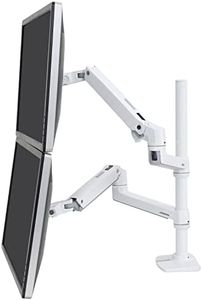
Ergotron – LX Vertical Stacking Dual Monitor Arm, VESA Desk Mount – for 2 Monitors Up to 40 Inches, 7 to 22 lbs Each – Tall Pole, White

Rating
10.0
Chosen by1,382
Weight Capacity
Adjustability
Build Quality

Most important from
1534 reviews

Weight Capacity
Incredibly sturdy and holds up well within guidelines, even with curved monitors, without any sagging.
Adjustability
Versatile range of motion, allowing for easy adjustment and stability.
Build Quality
The mount's construction quality is excellent, ensuring it remains attractive and functional for years.
Cable Management
While the cable management system is functional, it's not the best and feels like an afterthought.

The Ergotron LX Vertical Stacking Dual Monitor Arm is designed to enhance your workspace, particularly if you use two monitors up to 40 inches in size and between 7-22 pounds each. One of its biggest strengths is its adjustability; you can easily lift the monitors up 13 inches and tilt them up to 75 degrees for optimal viewing angles. The rotation feature allows for 360-degree movement, making it versatile for different tasks, whether working alone or collaborating with others.

The product also boasts excellent build quality, which is reflected in its heavy-duty construction and the 10-year warranty that comes with it. This means it’s built to last and can securely hold your monitors without wobbling, which is essential if you are using it in a busy office environment.

There are a few considerations to keep in mind. While the dual monitor setup is great, it may be overkill for those who only need a single monitor or have limited desk space. The mounting options, while versatile, require a sturdy desk—so be sure your workspace can accommodate the clamp or grommet mounts. Additionally, while the cable management system helps keep things tidy, some users might find it a bit fiddly during initial setup.

Rating
10.0
Chosen by1,382
Weight Capacity
Adjustability
Build Quality

Most important from
1534 reviews

Weight Capacity
Incredibly sturdy and holds up well within guidelines, even with curved monitors, without any sagging.
Adjustability
Versatile range of motion, allowing for easy adjustment and stability.
Build Quality
The mount's construction quality is excellent, ensuring it remains attractive and functional for years.
Cable Management
While the cable management system is functional, it's not the best and feels like an afterthought.
#2

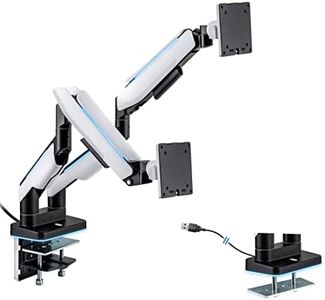
Mount-It! Heavy Duty Dual Monitor Arm up to 35 in. 44 lbs Screens, RGB Lights, 75x75 100x100 VESA Desk Mount for 2 Widescreen Curved Monitors 27 32 34 35 inches, Gas Spring, Clamp, Grommet, RGB Lights

Rating
9.4
Weight Capacity
Adjustability
Mounting Options

Most important from
35 reviews

Weight Capacity
Easy to set up and very sturdy, supporting multiple 32-inch monitors effortlessly.
Adjustability
This dual monitor arm adjusts very well and actually holds large monitors, maintaining the tilt perfectly.
Mounting Options
Mounting via the clamp option was really easy, though clearer instructions would have been helpful.

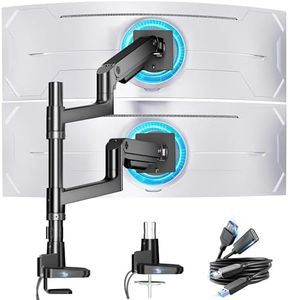
The Mount-It! Heavy Duty Dual Monitor Arm stands out for those needing a reliable support system for larger screens. It comfortably holds monitors up to 35 inches and 44 pounds, making it suitable for both work and gaming setups. Its robust build quality, crafted from aluminum and steel, ensures stability. The arm offers impressive adjustability, featuring full motion capabilities, including an 18-inch arm extension, 180° swivel, and a tilt range of 70°, allowing users to find the perfect viewing angle.

Cable management is a highlight, helping keep your workspace tidy. Furthermore, the inclusion of RGB lighting adds a fun aesthetic element for gamers, with 20 color options to suit different moods. The installation process is user-friendly, with options for both C-clamp and grommet mounting, fitting various desk setups.

However, there are a couple of drawbacks. While the arm supports significant weight, users should ensure that their monitors fit the VESA compatibility guidelines (75x75 and 100x100), which can be a limitation for some models. The RGB feature, while visually appealing, may not be essential for all users, particularly those focused solely on productivity rather than gaming aesthetics. Additionally, weighing in at 20.2 pounds, the arm itself is somewhat heavy, which might be a concern for those looking for lighter options or easier portability.

Rating
9.4
Weight Capacity
Adjustability
Mounting Options

Most important from
35 reviews

Weight Capacity
Easy to set up and very sturdy, supporting multiple 32-inch monitors effortlessly.
Adjustability
This dual monitor arm adjusts very well and actually holds large monitors, maintaining the tilt perfectly.
Mounting Options
Mounting via the clamp option was really easy, though clearer instructions would have been helpful.
#3

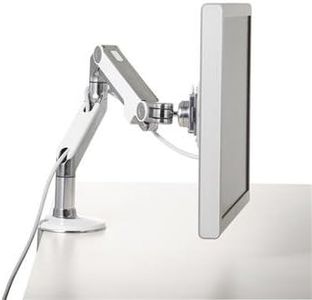
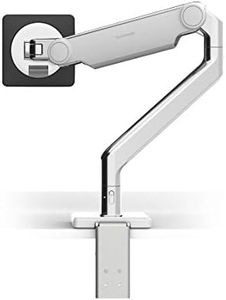
Humanscale M8 Adjustable Articulating Monitor Arm - Two Piece Clamp On Mount with Base - Polished Aluminum with White Trim

Rating
9.1
Weight Capacity
Adjustability
Mounting Options

Most important from
16 reviews

Weight Capacity
Supports very heavy and large monitors reliably, making it ideal for professional setups with big screens.
Adjustability
The articulating arm provides flexible positioning, allowing frequent and smooth monitor movement, though slightly more height would benefit certain desk configurations.
Mounting Options
Clamp mounting avoids drilling and protects desk surfaces, but desk thickness compatibility and arm reach may limit placement options.
Build Quality and Materials
The polished aluminum finish paired with white trim delivers a premium, high-end look that stands out.
Cable Management
Integrated cable management keeps wires organized, though it only moderately conceals cables compared to some competitors.

The Humanscale M8 Adjustable Articulating Monitor Arm is built to handle heavier and larger monitors, supporting weights from 8 up to 42 pounds, making it a strong choice for users with big or multiple screens. Its polished aluminum build with white trim feels solid and durable, reflecting good build quality. The arm offers great flexibility with its articulating movement and includes removable 180° stop blocks that prevent the arm from swinging into walls, adding a thoughtful touch for tighter spaces.

It clamps onto your desk, which means you don’t need to drill holes, though this might not be ideal if you prefer permanent mounting. Cable management is integrated and keeps wires tidy and out of the way, helping maintain a clean setup. The arm is designed to work with most monitors that fit the VESA mounting standard. The maximum monitor size supported is 42 inches, so extremely large or ultra-wide monitors might not be suitable. Also, the clamp mount could potentially limit desk thickness compatibility.

This monitor arm suits professionals or anyone needing a sturdy, flexible solution for medium to heavy monitors, especially if you want a neat, organized workspace without wall mounting.

Rating
9.1
Weight Capacity
Adjustability
Mounting Options

Most important from
16 reviews

Weight Capacity
Supports very heavy and large monitors reliably, making it ideal for professional setups with big screens.
Adjustability
The articulating arm provides flexible positioning, allowing frequent and smooth monitor movement, though slightly more height would benefit certain desk configurations.
Mounting Options
Clamp mounting avoids drilling and protects desk surfaces, but desk thickness compatibility and arm reach may limit placement options.
Build Quality and Materials
The polished aluminum finish paired with white trim delivers a premium, high-end look that stands out.
Cable Management
Integrated cable management keeps wires organized, though it only moderately conceals cables compared to some competitors.

Buying Guide for the Best Heavy Duty Monitor Arm

Choosing the right heavy-duty monitor arm can significantly improve your workspace ergonomics and productivity. A monitor arm allows you to adjust the position of your monitor to reduce strain on your neck, back, and eyes. When selecting a heavy-duty monitor arm, it's important to consider several key specifications to ensure it meets your needs and can support your monitor effectively.
Weight CapacityWeight capacity refers to the maximum weight the monitor arm can support. This is crucial because if your monitor is too heavy for the arm, it could cause the arm to sag or even break. Monitor arms typically have weight capacities ranging from 10 to 50 pounds or more. To choose the right one, check the weight of your monitor and ensure the arm can support at least that much weight. If you plan to upgrade to a heavier monitor in the future, consider an arm with a higher weight capacity.
AdjustabilityAdjustability refers to the range of motion the monitor arm offers, including height adjustment, tilt, swivel, and rotation. This is important for achieving the most comfortable and ergonomic viewing position. Monitor arms can vary from basic models with limited adjustability to advanced models that offer full range of motion. If you need to frequently change the position of your monitor or share your workspace with others, look for an arm with extensive adjustability. For a more static setup, a simpler model may suffice.
Mounting OptionsMounting options refer to how the monitor arm attaches to your desk or wall. Common mounting types include clamp mounts, grommet mounts, and wall mounts. This is important because the mounting type must be compatible with your desk or workspace. Clamp mounts are versatile and easy to install, making them suitable for most desks. Grommet mounts require a hole in the desk but provide a more secure attachment. Wall mounts are ideal if you want to save desk space but require a sturdy wall for installation. Choose the mounting option that best fits your workspace setup.
VESA CompatibilityVESA compatibility refers to the standard mounting hole pattern on the back of your monitor that the arm attaches to. This is important because the monitor arm must match the VESA pattern of your monitor to ensure a secure fit. VESA patterns are typically measured in millimeters, such as 75x75 or 100x100. Check your monitor's specifications to find its VESA pattern and ensure the monitor arm supports it. Most monitor arms are compatible with multiple VESA patterns, but it's always good to double-check.
Build Quality and MaterialsBuild quality and materials refer to the construction and durability of the monitor arm. This is important because a well-built arm will last longer and provide better support for your monitor. Monitor arms are typically made from materials like steel, aluminum, or high-quality plastic. Steel and aluminum arms are more durable and can support heavier monitors, while plastic arms are lighter and may be suitable for lighter monitors. Consider the environment where you'll be using the arm and choose a material that offers the right balance of strength and weight.
Cable ManagementCable management refers to the ability of the monitor arm to organize and hide your monitor cables. This is important for keeping your workspace tidy and preventing cables from getting tangled or damaged. Some monitor arms come with built-in cable management systems, such as clips or channels, to route cables neatly along the arm. If you have multiple cables or want a clean and organized desk, look for a monitor arm with good cable management features. This will help maintain a clutter-free workspace and protect your cables.

FAQ