We Use CookiesWe use cookies to enhance the security, performance, functionality and for analytical and promotional activities. By continuing to browse this site you are agreeing to our privacy policy

10 Best Monitors With Thunderbolt Port 2026 in the United States
How do we rank products for you?

Our technology thoroughly searches through the online shopping world, reviewing hundreds of sites. We then process and analyze this information, updating in real-time to bring you the latest top-rated products. This way, you always get the best and most current options available.

headphones-stars

Our Top Picks

#1

Winner

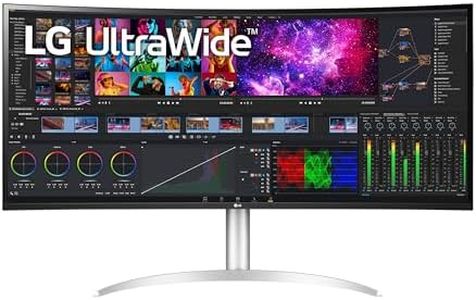
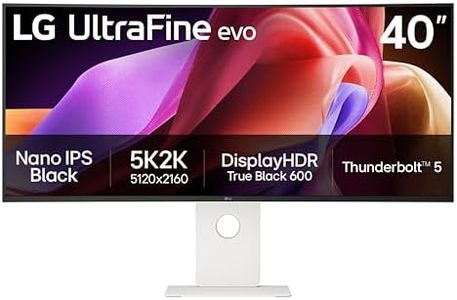
LG 40U990A-W 40-inch Ultrafine evo 5K2K WUHD (5120 x 2160) Nano IPS Curved Monitor, Thunderbolt 5, DisplayHDR 600, Built-in Speaker, 120Hz, HDMI 2.1, DP 2.1, USB C, Tilt/Height/Swivel Stand, White

Rating
10.0
Chosen by1,220
Resolution
Connectivity
Ergonomics

Most important from
63 reviews

Resolution
The monitor delivers stunning picture quality with impressive color depth and sharp resolution, making it ideal for creative professionals.
Connectivity
The inclusion of a Thunderbolt 5 cable and multiple connectivity options simplifies setup and enhances versatility.
Ergonomics
The sturdy square base and excellent height adjustment contribute to a comfortable and stable user experience.

The LG 40U990A-W is a standout 40-inch curved monitor with an ultra-wide 5K2K resolution (5120 x 2160), providing a large and sharp workspace that’s perfect for creative professionals like video editors, designers, and photographers. Thanks to its Nano IPS Black panel, the colors are vibrant and accurate, covering up to 99% of the DCI-P3 color spectrum, which means you get deep blacks, bright highlights, and great contrast (2000:1 ratio). This makes it easy to see subtle details and color differences, valuable for tasks that require precision.

One of its highlights is the latest Thunderbolt 5 connectivity, allowing very fast data transfer, 96W charging for your laptop, and the option to connect two monitors in a chain, which can simplify multitasking and workspace setup. It also includes HDMI 2.1, DisplayPort 2.1, and several USB-C and USB 3.0 ports, so it offers versatile connection options without the need for extra adapters. The monitor supports a 120Hz refresh rate, which is smoother than standard screens and beneficial for gaming or video work, though it’s not primarily a gaming monitor. Its ergonomic stand allows tilt, height, and swivel adjustments, making it comfortable to use for long hours. The display has a matte surface, helping reduce glare, and built-in speakers with solid sound quality add convenience for casual media use.

The LG 40U990A-W is heavier than average (over 31 pounds) and is priced at a premium, reflecting its high-end features. It is excellent for creative and professional use, but casual users or those on a budget might find it more than they need. Despite the impressive specs, it may be excessive if ultra-wide 5K resolution or advanced color accuracy are not required. This monitor suits professionals and serious creators seeking a large, color-accurate display with cutting-edge connectivity like Thunderbolt 5. Its combination of resolution, color quality, and ports makes it a versatile tool for demanding workflows, though it might be more than necessary for everyday tasks.

Rating
10.0
Chosen by1,220
Resolution
Connectivity
Ergonomics

Most important from
63 reviews

Resolution
The monitor delivers stunning picture quality with impressive color depth and sharp resolution, making it ideal for creative professionals.
Connectivity
The inclusion of a Thunderbolt 5 cable and multiple connectivity options simplifies setup and enhances versatility.
Ergonomics
The sturdy square base and excellent height adjustment contribute to a comfortable and stable user experience.
#2

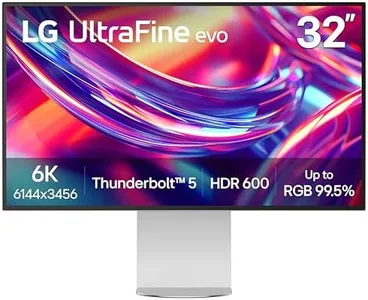
LG 32U990A-S 32-Inch Ultrafine 6K (6144 x 3456) Nano IPS Black Thunderbolt 5 Professional Monitor, 60Hz, DisplayHDR 600, Speakers, HDMI 2.1, DisplayPort 2.1, USB-C, Tilt/Height/Pivot Stand, Silver

Rating
9.7
Resolution
Screen Size
Color Accuracy

Most important from
63 reviews

Resolution
The visuals are stunning, delivering fantastic picture quality with impressive color depth and resolution.
Screen Size
A large, curved white monitor with high resolution is rare, making this model uniquely suited for those specific preferences.
Color Accuracy
The visuals are stunning, delivering fantastic picture quality with impressive color depth and resolution.
Connectivity
The included Thunderbolt 5 cable and variety of connectivity options make pairing with devices like the Apple Mac Studio seamless.
Ergonomics
Height adjustment is smooth and adds to the ergonomic flexibility of the monitor.

The LG 32U990A-S is a 32-inch professional monitor designed especially for creative pros who need high resolution and precise color. Its standout feature is a stunning 6K resolution (6144 x 3456), offering incredibly sharp images and plenty of pixel space to work with detailed visuals and multiple tool windows. The Nano IPS Black panel delivers excellent color accuracy with up to 99.5% Adobe RGB and 98% DCI-P3 coverage, along with deep blacks thanks to a 2000:1 contrast ratio. This makes it great for color-critical tasks like photo editing, video grading, and 3D design.

The 60Hz refresh rate is standard for professional work, although it may not be ideal for users who require very high frame rates or smoother motion in gaming and fast video playback. Connectivity is a strong point, featuring Thunderbolt 5—the latest and fastest version—allowing super-fast data transfers, daisy chaining multiple monitors, and 96W power delivery to keep laptops charged. It also includes HDMI 2.1, DisplayPort 2.1, and USB-C ports, making it versatile for various setups.

Ergonomics are well covered with tilt, height, pivot, and rotation adjustments plus a virtually borderless design that helps when using multiple monitors side by side. The display also supports DisplayHDR 600, enhancing brightness and contrast for more vivid and realistic images. Users should consider that the monitor’s size and resolution might require a powerful computer to drive it efficiently. The LG 32U990A-S is a strong option for creative professionals who need superb image quality, future-proof Thunderbolt 5 connectivity, and ergonomic flexibility in a 6K monitor.

Rating
9.7
Resolution
Screen Size
Color Accuracy

Most important from
63 reviews

Resolution
The visuals are stunning, delivering fantastic picture quality with impressive color depth and resolution.
Screen Size
A large, curved white monitor with high resolution is rare, making this model uniquely suited for those specific preferences.
Color Accuracy
The visuals are stunning, delivering fantastic picture quality with impressive color depth and resolution.
Connectivity
The included Thunderbolt 5 cable and variety of connectivity options make pairing with devices like the Apple Mac Studio seamless.
Ergonomics
Height adjustment is smooth and adds to the ergonomic flexibility of the monitor.
#3

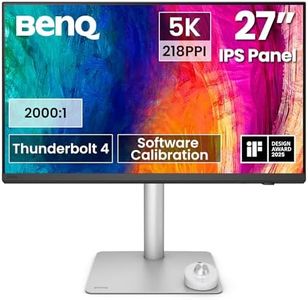
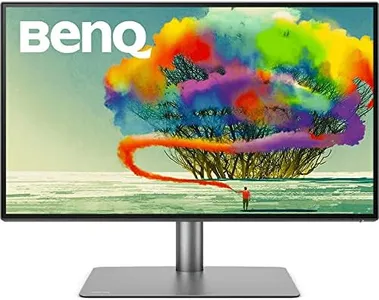
BenQ PD2730S 27" 5K 218 PPI Mac Monitor, 90W Thunderbolt 4, 98% P3, Uniformity, 2000:1 Contrast, Nano Matte Panel, Daisy Chain, KVM, Height Adjustable, for 3D Artists, VFX Animators, Game Designers

Rating
9.4
Resolution
Screen Size
Color Accuracy

Most important from
27 reviews

Resolution
The ultra-sharp 5K resolution and excellent color calibration deliver vibrant, precise visuals ideal for detailed creative work.
Screen Size
The monitor’s size and ultra-wide workspace enhance productivity, especially for video editing and design, though it may take some time to adapt to the wider field of view.
Color Accuracy
Color performance is impressive with 98% P3 coverage, true 10-bit color support (via HDMI), and minimal color shift, making it suitable for professional-grade photo and video editing.
Connectivity
The built-in KVM switch combined with Thunderbolt connectivity streamlines multitasking by allowing control of multiple computers with one keyboard and mouse.
Ergonomics
The sturdy and thoughtfully designed monitor stand offers stability and a clean, finished look with a quick-release mount for easy setup.

The BenQ PD2730S is a 27-inch monitor that stands out with its ultra-sharp 5K resolution (5120x2880), which offers much more detail and workspace than typical 4K screens—great if you work with detailed visuals like 3D art or video editing. It boasts excellent color accuracy with 98% P3 coverage and a strong 2000:1 contrast ratio, delivering vibrant colors and deep blacks that professionals in design and animation will appreciate. The matte nano surface reduces glare and reflections, helping to reduce eye strain during long creative sessions.

Connectivity is a strong point: the Thunderbolt 4 port supports fast data transfer, up to 90W power delivery, and can even connect two 5K monitors or one 8K display if needed, making it very versatile for Mac users or anyone needing high-speed connections. Ergonomically, it offers height adjustment to help you find a comfortable working position. It also includes a handy built-in KVM switch, allowing you to control two computers with one keyboard and mouse, which can streamline multitasking.

While the monitor excels in color and resolution, its weight and size could be a consideration if space is limited. This monitor is tailored for creative professionals who value color precision, high resolution, and connectivity, especially those using Macs or needing Thunderbolt 4 compatibility.

Rating
9.4
Resolution
Screen Size
Color Accuracy

Most important from
27 reviews

Resolution
The ultra-sharp 5K resolution and excellent color calibration deliver vibrant, precise visuals ideal for detailed creative work.
Screen Size
The monitor’s size and ultra-wide workspace enhance productivity, especially for video editing and design, though it may take some time to adapt to the wider field of view.
Color Accuracy
Color performance is impressive with 98% P3 coverage, true 10-bit color support (via HDMI), and minimal color shift, making it suitable for professional-grade photo and video editing.
Connectivity
The built-in KVM switch combined with Thunderbolt connectivity streamlines multitasking by allowing control of multiple computers with one keyboard and mouse.
Ergonomics
The sturdy and thoughtfully designed monitor stand offers stability and a clean, finished look with a quick-release mount for easy setup.

Buying Guide for the Best Monitors With Thunderbolt Port

Choosing the right monitor with a Thunderbolt port can significantly enhance your computing experience, especially if you need high-speed data transfer, daisy-chaining capabilities, and a clutter-free workspace. To make an informed decision, it's important to understand the key specifications and how they align with your specific needs. Here are the main specs to consider when selecting a monitor with a Thunderbolt port.
ResolutionResolution refers to the number of pixels on the screen, typically represented as width x height (e.g., 1920x1080). Higher resolution means more detail and sharper images. Common resolutions include Full HD (1920x1080), Quad HD (2560x1440), and 4K (3840x2160). If you need a monitor for general use or office work, Full HD might suffice. For creative work like photo or video editing, a higher resolution like 4K is beneficial for better detail and clarity.
Screen SizeScreen size is measured diagonally in inches. It affects how much screen real estate you have and how immersive your viewing experience will be. Common sizes range from 24 to 32 inches. Smaller screens (24-27 inches) are suitable for standard office tasks and smaller desks, while larger screens (28-32 inches) are better for multitasking, gaming, or creative work where more space is advantageous.
Refresh RateRefresh rate, measured in Hertz (Hz), indicates how many times per second the screen refreshes its image. Standard monitors have a 60Hz refresh rate, which is adequate for most tasks. Higher refresh rates (120Hz, 144Hz, or even 240Hz) provide smoother motion and are particularly beneficial for gaming or fast-paced video content. Choose a higher refresh rate if you are a gamer or work with motion graphics.
Color AccuracyColor accuracy is crucial for tasks that require precise color representation, such as photo and video editing. Monitors with higher color accuracy typically support wider color gamuts (like sRGB, Adobe RGB, or DCI-P3) and have better calibration. If color accuracy is important for your work, look for monitors that offer factory calibration and support a wide color gamut.
ConnectivityWhile the Thunderbolt port is a key feature, it's also important to consider other connectivity options like HDMI, DisplayPort, and USB ports. These additional ports can provide flexibility for connecting multiple devices. Ensure the monitor has the necessary ports to connect all your peripherals and devices seamlessly.
ErgonomicsErgonomics refers to the monitor's adjustability features, such as height, tilt, swivel, and pivot. Good ergonomics can help you maintain a comfortable and healthy posture while working. If you spend long hours in front of the screen, look for a monitor with adjustable stand options to customize the viewing angle and height to your preference.
Panel TypeThe panel type affects the monitor's color reproduction, viewing angles, and response time. Common panel types include IPS (In-Plane Switching), TN (Twisted Nematic), and VA (Vertical Alignment). IPS panels offer the best color accuracy and viewing angles, making them ideal for creative work. TN panels have faster response times, which are better for gaming. VA panels provide good contrast ratios and are suitable for general use and media consumption.

FAQ