We Use CookiesWe use cookies to enhance the security, performance, functionality and for analytical and promotional activities. By continuing to browse this site you are agreeing to our privacy policy

10 Best Multi Page Scanners 2026 in the United States

How do we rank products for you?

Our technology thoroughly searches through the online shopping world, reviewing hundreds of sites. We then process and analyze this information, updating in real-time to bring you the latest top-rated products. This way, you always get the best and most current options available.

headphones-stars

Our Top Picks

#1

Winner

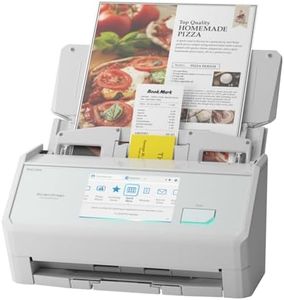
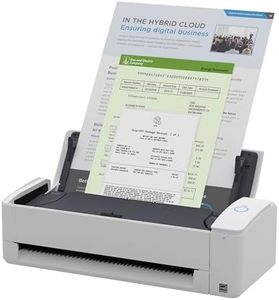
ScanSnap iX2500 Wireless or USB High-Speed Cloud Enabled Document, Photo & Receipt Scanner with Large 5" Touchscreen and 100 Page Auto Document Feeder for Mac or PC, White

Rating
10.0
Chosen by1,116
Scanning Speed
Resolution
Connectivity Options

Most important from
87 reviews

Scanning Speed
The scanner delivers an impressively fast and smooth scanning experience, handling multi-page batches without jams or delays.
Resolution
Color quality on photos and documents is outstanding, surpassing expectations compared to previous scanners.
Connectivity Options
Setup and connectivity are seamless, including stable Bluetooth pairing and versatile options for wireless or USB-C connections.
Software and Compatibility
Its intuitive touchscreen interface makes operation straightforward, enabling even less tech-savvy users to scan effortlessly.
Size and Portability
Compact enough to fit comfortably on a desk while folding away neatly to save space when not in use.
Maintenance and Durability
The device’s reliability and ease of use significantly reduce stress and time spent managing large volumes of paperwork and photos.

The ScanSnap iX2500 is a strong choice for anyone needing a multi-page scanner that handles a variety of documents quickly and efficiently. It scans at a fast 45 pages per minute with double-sided (duplex) capability, making it well suited for busy offices or home users with lots of paperwork. The 100-sheet automatic document feeder means you can scan large batches without constantly reloading paper, saving you time. The scanner offers good image quality with up to 600 dpi resolution, which is sharp enough for most documents, photos, and receipts. Its touchscreen interface stands out for easy operation, allowing you to customize scanning profiles and quickly send files to multiple destinations like PC, Mac, mobile devices, or cloud services.

Connectivity is versatile, supporting both stable USB-C and fast Wi-Fi 6, which is handy if you want to scan wirelessly without a computer. The device includes helpful features to prevent paper jams or damage, such as sensors that detect stuck pages and smooth paper feeding, which adds reliability and reduces frustration. While it weighs about 7.7 pounds and is fairly compact, it’s not designed for high portability but fits well on a desk. Software support helps organize and edit scanned documents automatically, making it easier to find and manage your files.

One minor drawback is the scanner's size may be a bit bulky for very small workspaces, and while it’s highly capable, the price might be on the higher side compared to basic models. For those who frequently scan multi-page documents and want a smooth, user-friendly experience with strong connectivity options, the ScanSnap iX2500 remains a solid, dependable option.

Rating
10.0
Chosen by1,116
Scanning Speed
Resolution
Connectivity Options

Most important from
87 reviews

Scanning Speed
The scanner delivers an impressively fast and smooth scanning experience, handling multi-page batches without jams or delays.
Resolution
Color quality on photos and documents is outstanding, surpassing expectations compared to previous scanners.
Connectivity Options
Setup and connectivity are seamless, including stable Bluetooth pairing and versatile options for wireless or USB-C connections.
Software and Compatibility
Its intuitive touchscreen interface makes operation straightforward, enabling even less tech-savvy users to scan effortlessly.
Size and Portability
Compact enough to fit comfortably on a desk while folding away neatly to save space when not in use.
Maintenance and Durability
The device’s reliability and ease of use significantly reduce stress and time spent managing large volumes of paperwork and photos.
#2

Epson FastFoto FF-680W Wireless High-Speed Photo and Document Scanning System, Black

Rating
8.8
Scanning Speed
Duplex Scanning
Software and Compatibility

Most important from
3305 reviews

Scanning Speed
This scanner truly lives up to being the world's fastest personal photo scanner, effortlessly digitizing thousands of photos within days.
Duplex Scanning
The scanner's ability to scan both sides of a photo automatically, capturing handwritten notes on the reverse, is a significant time-saver.
Software and Compatibility
The software's optical character recognition and image enhancement features are top-notch, making the scanner incredibly versatile.

The Epson FastFoto FF-680W is a standout in the multi-page scanner category, particularly for individuals who prioritize speed and versatility in scanning photos and documents. With its ability to scan up to 36 photos at once at a rapid pace of one photo per second, it is an excellent choice for those looking to digitize large photo collections quickly. The scanner’s impressive resolution of up to 600 dpi ensures that images are captured with clarity, which is vital for preserving memories.

One of the key strengths is its Automatic Document Feeder (ADF) capacity, allowing for efficient batch scanning without the need for constant supervision. The inclusion of duplex scanning means that users can easily scan double-sided documents in one go, a great feature for office use. Additionally, the scanner supports various connectivity options, including USB and wireless, making it easy to set up and use in different environments.

The scanner is equipped with advanced software features like optical character recognition (OCR), which enhances its functionality for document management, allowing users to convert scanned images into editable text. Its flexibility to handle multiple formats and sizes makes it a versatile tool for both photos and documents. On the downside, while the Epson FastFoto FF-680W performs remarkably well, it is a bit heavier than other portable scanners, weighing 8.2 pounds, which may be a consideration for users looking for something highly portable. Additionally, although it excels in photo scanning, users looking for extremely high-resolution document scanning beyond 600 dpi may find it limiting. The Epson FastFoto FF-680W is well-suited for families, photographers, and small businesses needing a quick and reliable scanner that can handle both photos and documents with ease. Its blend of speed, quality, and software support makes it a strong contender in the multi-page scanner market, despite the slight trade-off in portability.

Rating
8.8
Scanning Speed
Duplex Scanning
Software and Compatibility

Most important from
3305 reviews

Scanning Speed
This scanner truly lives up to being the world's fastest personal photo scanner, effortlessly digitizing thousands of photos within days.
Duplex Scanning
The scanner's ability to scan both sides of a photo automatically, capturing handwritten notes on the reverse, is a significant time-saver.
Software and Compatibility
The software's optical character recognition and image enhancement features are top-notch, making the scanner incredibly versatile.
#3

ScanSnap iX1400 High-Speed Simple One-Touch Button Color Document, Photo & Receipt Scanner with Auto Document Feeder for Mac or PC, Black

Rating
8.5
Scanning Speed
Duplex Scanning
Software and Compatibility

Most important from
967 reviews

Scanning Speed
This scanner is a huge upgrade from all-in-one printer/scanners, eliminating past issues like slow speed and page jams.
Duplex Scanning
It scans at an impressive rate of about 40 pages per minute, even double-sided.
Software and Compatibility
While the software has many options, it can be a bit clunky and adds unnecessary steps.
Size and Portability
The compact design fits neatly on a desk, occupying minimal space.

The ScanSnap iX1400 is a high-speed, one-touch button color scanner suitable for both Mac and PC users. This scanner excels in ease of use with its simple one-touch operation, making it a great choice for those who need a straightforward scanning solution. The automatic document feeder (ADF) is capable of handling various paper types including business cards, receipts, and envelopes, which adds to its versatility. However, its ADF capacity is not specified, which might be a limitation for those needing to scan large volumes of documents in one go.

The scanner offers reliable performance with a wired USB connection, ensuring stable and consistent operation, but lacks wireless connectivity options which could be a drawback for some users. With a resolution of 600 dpi, it provides clear and detailed scans, suitable for both documents and photos. The included ScanSnap Home software is a comprehensive tool for organizing and managing scanned materials, simplifying the process of editing and using scanned data.

At 7.1 pounds, it is relatively lightweight and compact, making it a good fit for small offices or home use. However, the size and portability might still be an issue for users needing a more portable solution. The device is designed to clean up scanned images automatically by detecting document size, color depth, and removing unnecessary elements like streaks and blank pages, which enhances the scanning quality. In terms of maintenance and durability, the product seems robust, but long-term reliability would depend on the user's frequency of use. While the ScanSnap iX1400 offers many strengths, its lack of wireless connectivity and unspecified ADF capacity are potential drawbacks to consider.

Rating
8.5
Scanning Speed
Duplex Scanning
Software and Compatibility

Most important from
967 reviews

Scanning Speed
This scanner is a huge upgrade from all-in-one printer/scanners, eliminating past issues like slow speed and page jams.
Duplex Scanning
It scans at an impressive rate of about 40 pages per minute, even double-sided.
Software and Compatibility
While the software has many options, it can be a bit clunky and adds unnecessary steps.
Size and Portability
The compact design fits neatly on a desk, occupying minimal space.

Buying Guide for the Best Multi Page Scanners

Choosing the right multi-page scanner can significantly improve your productivity, whether you're digitizing documents for personal use or managing a high-volume office environment. The key is to understand the various specifications and how they align with your specific needs. By focusing on the most important features, you can ensure that you select a scanner that meets your requirements and offers the best performance for your tasks.
Scanning SpeedScanning speed is measured in pages per minute (PPM) and indicates how quickly a scanner can process documents. This spec is crucial if you need to scan large volumes of documents regularly. Scanners with speeds of 20-30 PPM are suitable for moderate use, while those with speeds of 40-60 PPM or higher are ideal for high-volume environments. Consider your typical workload to determine the appropriate scanning speed for your needs.
ResolutionResolution, measured in dots per inch (DPI), determines the clarity and detail of the scanned images. Higher DPI values produce clearer and more detailed scans, which is important for documents with small text or intricate graphics. For general document scanning, 300 DPI is usually sufficient. If you need to scan photos or detailed images, look for scanners with 600 DPI or higher.
Automatic Document Feeder (ADF) CapacityThe ADF capacity indicates how many pages the scanner can hold and process automatically without manual intervention. This feature is essential for multi-page scanning tasks. ADF capacities can range from 20 to over 100 pages. For occasional use, a lower capacity may suffice, but for frequent, high-volume scanning, a higher ADF capacity will save time and effort.
Duplex ScanningDuplex scanning allows the scanner to scan both sides of a page simultaneously. This feature is important if you frequently work with double-sided documents, as it can significantly speed up the scanning process and reduce manual handling. If you often scan double-sided documents, ensure the scanner supports duplex scanning.
Connectivity OptionsConnectivity options determine how the scanner connects to your computer or network. Common options include USB, Wi-Fi, and Ethernet. USB is suitable for direct connections to a single computer, while Wi-Fi and Ethernet are ideal for shared use in an office environment. Consider your setup and whether you need the flexibility of wireless or networked scanning.
Software and CompatibilityThe software that comes with the scanner can greatly affect its usability and functionality. Look for scanners that include robust software for document management, OCR (optical character recognition), and integration with cloud services. Additionally, ensure the scanner is compatible with your operating system and any specific applications you use.
Size and PortabilityThe physical size and portability of the scanner can be important depending on your workspace and how you plan to use it. Compact and portable scanners are ideal for small offices or mobile use, while larger, more robust models are better suited for dedicated scanning stations. Consider the available space and whether you need to move the scanner frequently.
Maintenance and DurabilityMaintenance and durability are important factors, especially for high-volume use. Look for scanners with easy-to-replace parts and good customer support. Durable models with a high daily duty cycle rating are designed to handle frequent use without frequent breakdowns. Assess your scanning volume and choose a model that can reliably meet your demands.

FAQ